What it is
I built CredosisApi as part of the engineering team at Credosis, the organization behind credosis.com. It’s the backend for two things: a public meeting scheduler on the Credosis marketing site, and the internal admin console the team uses to run it. The live booking flow it powers is on the Credosis site at credosis.com/contact#book.
A visitor picks an open time slot and books a call in a couple of clicks, a lot like Calendly. Behind that single click, a few things need to happen - and all of them need to go right:
- the seat gets reserved safely, even if two people click at the same second,
- a Google Calendar event is created with a Google Meet link,
- and confirmation emails go out to both the visitor and the team.
On the other side, the team logs into an admin dashboard to set their weekly availability, generate bookable slots, reschedule or cancel bookings, handle contact-form messages, keep an eye on email delivery, and read an audit trail of everything that happened.
Here’s the whole thing in one picture:
flowchart LR
    V["Visitor"] -->|"picks a slot, books"| API["CredosisApi<br/>(.NET 8)"]
    A["Admin"] -->|"sets availability,<br/>manages bookings"| API
    API --> DB[("PostgreSQL")]
    API -->|"create event + Meet link"| GC["Google Calendar"]
    API -->|"queue email"| MAIL["Brevo email"]
    MAIL --> V
    MAIL --> A
The goal was a small, dependable service with no surprises in production - where a third-party outage slows things down gracefully instead of breaking a booking, and where every change is something you can look up afterward.
Why build it instead of using Calendly
Credosis needed its own booking backend rather than an off-the-shelf scheduler, for three reasons:
- Own the booking experience. The scheduling UI is part of the marketing site, so the booking logic had to plug into a custom frontend - not sit inside someone else’s embedded widget.
- Real calendar integration. Every booking has to land on the team’s Google Calendar with a working Meet link, automatically. No copy-pasting links by hand.
- Email you can trust. Confirmation, reschedule, and cancellation emails can’t be “send it and hope.” A dropped confirmation email is a missed meeting.
Once scheduling was covered, the same service picked up contact management, analytics, and an audit trail - the everyday plumbing that turns a booking endpoint into a tool the team can actually run the business on.
How the code is organized
The project uses a layered structure. Each layer only depends on the one beneath it, which keeps the business rules from getting tangled up in framework and infrastructure details.
flowchart TD
    P["Presentation<br/>controllers, request/response DTOs, validation"]
    B["Business<br/>services (the actual use cases), domain rules"]
    D["Data<br/>EF Core, entities, repositories, migrations"]
    I["Infrastructure<br/>Google Calendar, email, background workers"]
    C["Common<br/>time zone clock, pagination, rate limits"]

    P --> B
    B --> D
    B --> I
    P -.uses.-> C
    B -.uses.-> C
A few habits keep the codebase consistent:
- Every service hides behind an interface. Controllers depend on the
interface, and all the wiring lives in one place (
Program.cs). Easy to swap, easy to test. - Data access goes through repositories. Query logic stays out of the service methods, so services stay readable and the queries stay testable.
- Entities never leave the building. Requests and responses are their own small record types, validated with FluentValidation. Database entities don’t leak out to the API.
- Errors have one shape. A global handler turns domain exceptions
(
NotFound,Conflict,Validation) into standard Problem Details responses, so the frontend always gets a predictable, typed error.
The interesting parts
Booking: availability → slots → bookings
The scheduling core has three steps stacked on top of each other.
flowchart LR
    R["Availability rule<br/>e.g. Mon 9-5, 30-min slots"] -->|"admin generates"| S["Bookable slots<br/>concrete times"]
    S -->|"visitor books"| BK["Booking"]
Admins define availability rules - day of week, start and end time, slot length, how many people per slot. A generator then turns those rules into concrete, bookable slots for a date range. Visitors book against those slots.
Here’s what that looks like on the public site - a visitor picks a highlighted day, chooses an available time, then confirms with their details:
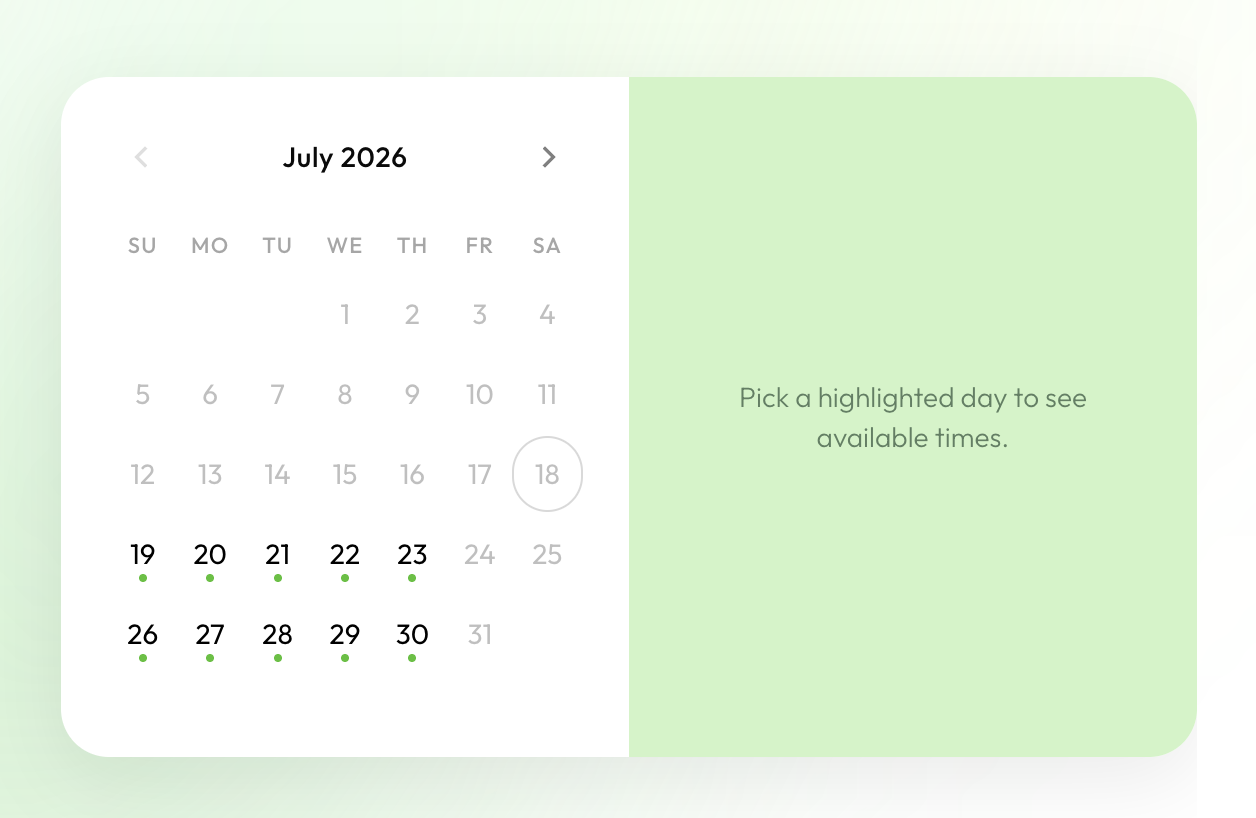
Month view - only days with open slots are highlighted.
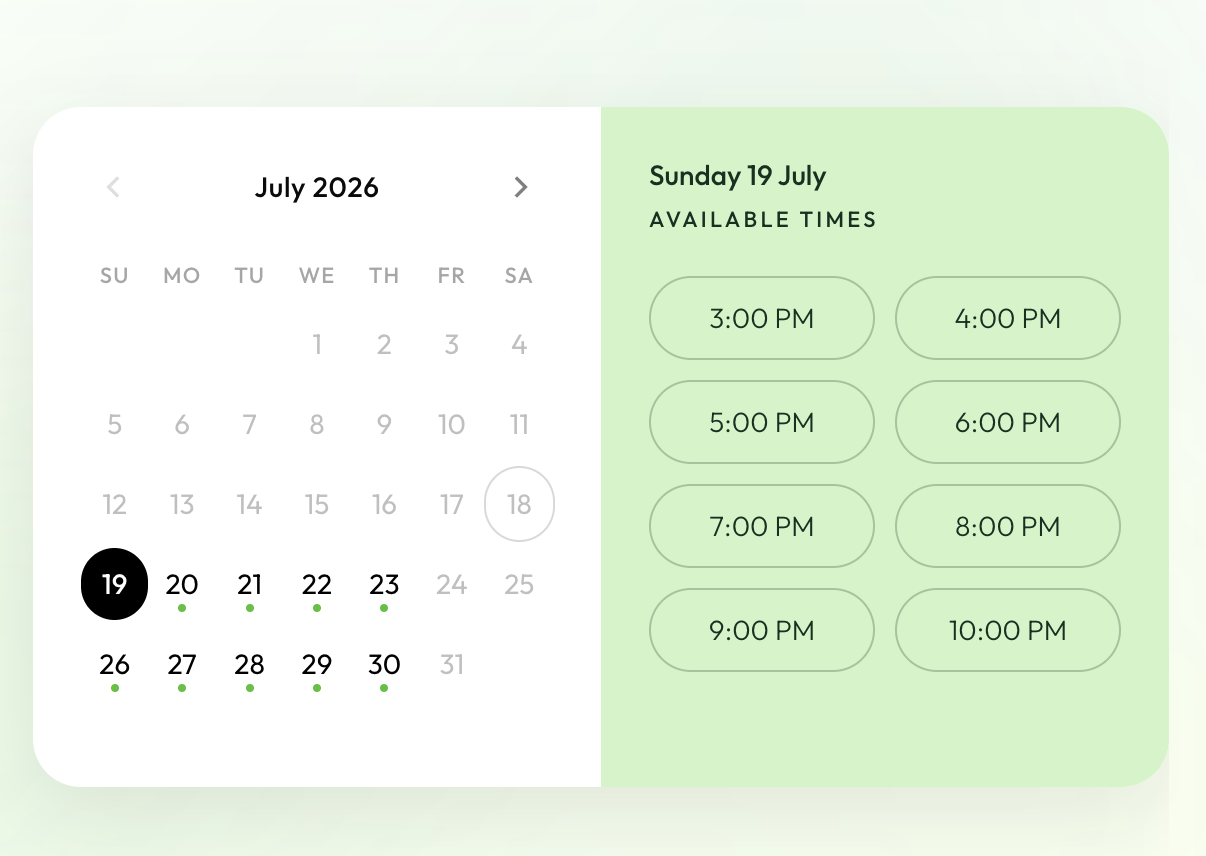
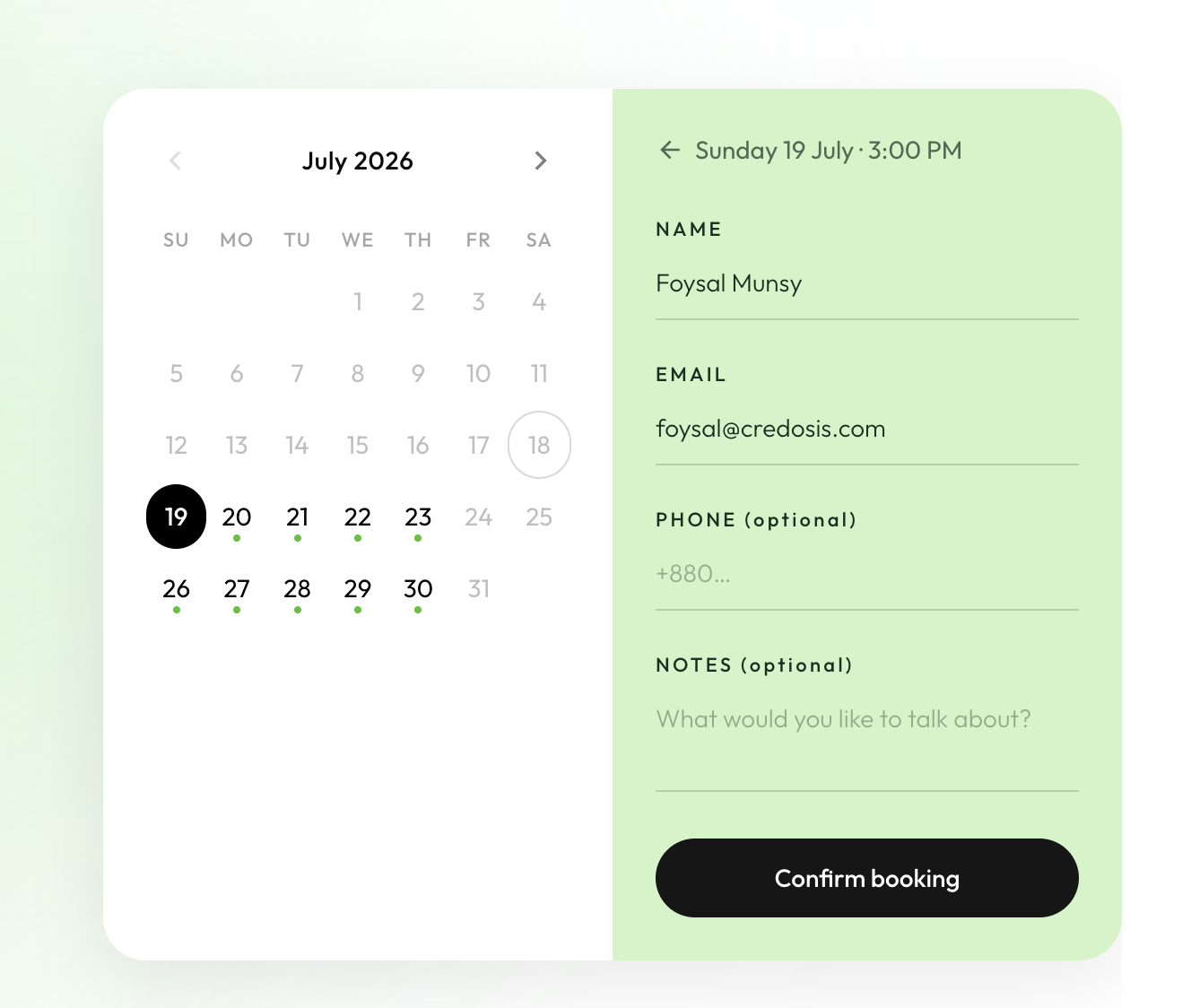
These are the public, visitor-facing screens the API serves. The internal admin console - where the team sets availability, generates slots, and manages bookings - is intentionally not shown here for organization security reasons.
The key decision here: generating slots is an explicit admin action, not something that quietly happens when a visitor loads the page. That keeps the public “list slots” endpoint read-only, so slots never mysteriously reappear after someone cleaned them up.
// Public slot listing is read-only. Slots are created by the admin "generate"
// action, never as a side effect of someone viewing the page.
var effectiveStart = request.Start < now ? now : request.Start;
var slots = await _slotRepository.GetAvailableAsync(
    effectiveStart, request.End, cancellationToken);

return slots
    .Where(x => x.AvailableSpots > 0)
    .Select(/* map to response */)
    .ToList();
Once booked, a booking can be rescheduled or cancelled, and every one of those changes keeps the seat count, the calendar event, and the emails in sync.
Two people, one last seat
This is the classic race condition: two visitors try to grab the last seat at the exact same moment. Who wins, and does the seat count stay correct?
sequenceDiagram
    participant A as Visitor A
    participant B as Visitor B
    participant DB as Database

    A->>DB: begin transaction, take the seat (version 4 → 5)
    B->>DB: begin transaction, take the seat (version 4 → 5)
    A->>DB: commit ✓
    Note over A,DB: A wins the seat
    B->>DB: commit ✗ (version already moved to 5)
    Note over B,DB: "try another slot" - no 500, no negative seats
The fix is an optimistic concurrency token plus a database transaction. Each slot
carries a Version number. When you book, you bump it. If someone else committed
first, your version is stale and the save fails cleanly.
await using var transaction = await _context.Database
    .BeginTransactionAsync(cancellationToken);

var slot = await _context.MeetingSlots
    .FirstAsync(x => x.Id == request.MeetingSlotId && x.IsActive, ct);

if (slot.AvailableSpots <= 0)
    throw new InvalidOperationException("This meeting slot is fully booked.");

slot.BookedCount++;
slot.Version++;   // optimistic concurrency token
// ... create the booking, then SaveChanges + Commit
If a competing transaction commits first, SaveChanges throws a
DbUpdateConcurrencyException. We catch it and turn it into a friendly “try
another slot” message instead of a 500. A unique constraint also stops the same
person from booking the same slot twice, and that’s translated into its own clear
error.
The result: under a race, exactly one booking wins, the other person gets a helpful message, and the seat count never goes negative.
Google Calendar & Meet, without letting it break bookings
Every booking creates a Google Calendar event with an auto-generated Meet link, and adds the visitor as a guest. It authenticates with a long-lived refresh token, so the service quietly mints fresh access tokens as they expire - no interactive login in production.
The important design choice: the whole Google integration is best-effort. It can fail, and when it does, the booking still succeeds.
public async Task<CalendarEventResult> CreateEventAsync(/* ... */)
{
    if (!IsEnabled) return default;         // does nothing when not configured

    try
    {
        // ... build the event with a Meet link, insert it
        return new CalendarEventResult(created.Id, meetingUrl);
    }
    catch (Exception ex)
    {
        // A calendar failure must never break the booking.
        _logger.LogError(ex, "Calendar event failed; booking continues.");
        return default;
    }
}
A Google outage, a network blip, or missing config can never fail a visitor’s booking. Worst case, the booking is saved without a Meet link. On reschedule the event is patched (the Meet link and guests are kept); on cancel it’s deleted.
And one subtle but important detail: these calendar calls happen after the database transaction commits. A slow response from Google never holds a database lock or blocks the visitor’s request.
Email that doesn’t get lost - the outbox pattern
Email reliability uses the transactional outbox pattern. Services never call
the email provider directly. Instead they drop a message into an OutboxMessage
table, in the same transaction as the booking. A background worker picks up
pending messages later and sends them, retrying with backoff if needed.
flowchart LR
    S["Booking service"] -->|"save booking + queue email<br/>(same transaction)"| DB[("OutboxMessage table")]
    W["OutboxProcessor<br/>(background worker)"] -->|"reads pending"| DB
    W -->|"send, retry on failure"| BR["Brevo API"]
This gives two guarantees:
- No lost emails. If the process crashes right after a booking, the email is already safely stored and goes out on the next run.
- No phantom emails. If the booking transaction rolls back, the queued email rolls back with it. You never send a confirmation for a booking that didn’t happen.
Delivery goes through the Brevo HTTP API (port 443) instead of SMTP, because a lot of hosts - including Render’s free tier - block outbound SMTP ports. A full SMTP sender is still in the codebase as a drop-in backup. Every email type has a branded HTML template on a shared layout: booking confirmation, reschedule, cancellation, the matching admin notifications, a contact-form alert, and admin-composed one-off emails with attachments.
Contact management
Contact-form submissions become Contact records with a simple status flow
(new → contacted → resolved), an admin alert email when one arrives, and
paginated, filterable admin endpoints to work through them. It’s deliberately
simple, but it means the team doesn’t need a second tool just for inbound leads.
Audit logging
Every privileged action - creating an availability rule, generating slots, cancelling or rescheduling a booking, changing a contact’s status - is written to an append-only audit log. It records who did it and from what IP, pulled from the request context. A query service exposes the trail with paging and filters, so “who changed this, and when” always has an answer.
Dashboard, analytics & auth
The admin side sits behind JWT authentication, with the settings validated on startup so a bad config fails immediately instead of at the first request. A dashboard service rolls up operational numbers (bookings, contacts, email health) and an analytics service shows trends - one at-a-glance view for the team.
Problems I ran into
Time zones. Availability rules are written in Bangladesh local time, but
slots are stored as UTC. Early on, “09:00” got saved as 09:00 UTC and then shown
as 3 PM locally - clearly wrong. The fix was a dedicated BusinessClock: rule
times are read in the business time zone and converted to UTC when slots are
generated, and Google Calendar gets the wall-clock time plus a time-zone id so it
stores the right moment.
What happens to slots when a rule changes. Editing or deleting an availability rule shouldn’t strand mismatched slots or quietly drop confirmed bookings. So the generator handles each case on purpose: future unbooked slots from a changed rule get removed, future booked slots get deactivated (the booking is kept, but no new bookings are accepted), and past slots are always kept as history.
Keeping third parties at arm’s length. Both Google Calendar and email are treated as unreliable by default. Calendar calls are best-effort and run after the commit; email goes through the durable outbox. Neither one can take down the core booking flow.
Consistent errors. Domain exceptions map to Problem Details responses, so the frontend can tell “slot full” (conflict) apart from “not found” apart from “validation failed” - without matching on error message strings.
Deployment
The service ships as a Docker image and runs on Render, configured through
render.yaml. Config and secrets come from environment variables (with a
gitignored .env for local dev), and the connection string accepts either the
native Npgsql format or a postgres:// URI, so a provider-issued string can be
pasted in as-is. Health checks - including a database readiness probe - back the
platform’s monitoring, and migrations can run automatically on startup behind a
config flag. Serilog handles structured request and app logging, and
X-Forwarded-* headers are honored so the real client IP and scheme survive the
reverse proxy.
What I took away from it
- Assume third parties will fail. Making Google Calendar best-effort and email durable-by-queue turned two potential single points of failure into non-events. The booking succeeds either way.
- Keep side effects out of read paths. Making slot generation an explicit admin action - not a side effect of a public page load - removed a whole class of “why did these slots come back?” bugs.
- Model time zones on purpose. A single
BusinessClockboundary between local-time rules and UTC storage prevented a whole category of off-by-hours bugs. - Optimistic concurrency is usually enough. For last-seat contention, a version number plus a transaction and a friendly retry beat heavier locking - simpler code and a better experience.
- Auditability is a feature. Logging every privileged action from day one made the admin console trustworthy and debugging almost boring.